



-


-
Business solutions
- If the site is forgotten by everyone, then you need an audit!
If the site is forgotten by everyone, then you need an audit!
Site audit is an analysis of a resource for compliance with the requirements set by search engines for subsequent search engine promotion, as well as an assessment of its ease of use and attractiveness for users.
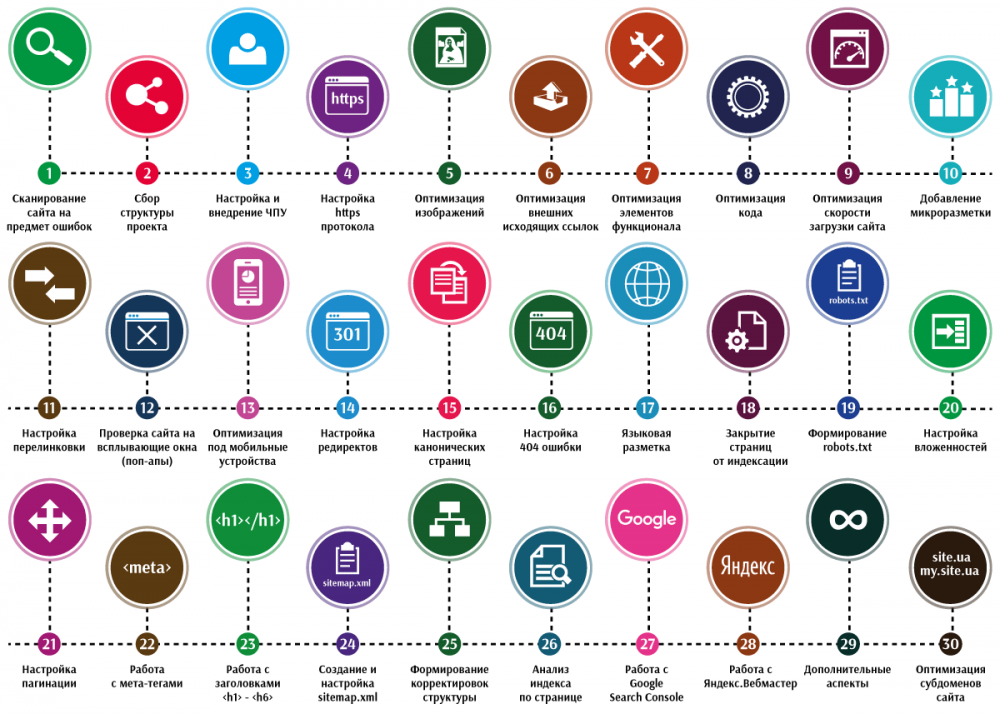
Typically, a site audit includes:
Technical audit
SEO audit
Usability audit
Marketing audit
A technical audit allows you to identify errors related to the operation of hosting and the site’s program code. Solving technical problems is the foundation for subsequent successful search promotion of the project.
A search or SEO audit is performed after a technical audit and is aimed at identifying and eliminating internal optimization errors.
A usability audit allows you to detect problems that prevent website users from effectively interacting with published content and working functionality, and is aimed at increasing conversion. Source: beseller

Today we will talk about technical and SEO site audit
Technical audit
Errors in HTML and CSS markup code
Errors in HTML and CSS lead to incorrect display of site pages, loss of positions in search results, and even falling under the search engine filter.
The most common mistakes in HTML and CSS:
An unrecommended tag is used;
not recommended characters in links;
required attribute not specified;
tag not closed;
HTML and CSS checking services scan your code and provide a detailed report for errors.
HTML Validator
CSS Validator
You can send the code for verification by services using a link, download it from a file, or copy the code text into the appropriate field.
Correct encoding of site pages
Due to incorrect encoding, site content may not display correctly. In addition to the fact that visitors will not like it, the site will not be indexed or will fall under the search engine filter.
To find out the encoding, look at the server's responses in special services.
The encoding is reported by the Content-Type string.
Content-Type: text/html; charset=utf-8 - indicates that your encoding is UTF-8.
Next, check whether the encoding that the server sends matches the actual encoding of the site. Open the source code of the site page and find the line containing the word charset inside the head tag.
<meta http-equiv="Content-Type" content="text/html; charset=UTF-8"> - the site page uses UTF-8 encoding.
If there is no such line, insert an encoding line between the opening and closing head tags to indicate the site's encoding in the site template file.
Windows-1251 and UTF-8 encodings display the site correctly and support Cyrillic characters.
Error 404 Not Found
A 404 error page is displayed when a site visitor tries to access a part of the resource that does not exist. If you have a lot of 404 error pages, your site will irritate users and drop in rankings.
Why do users end up on a non-existent page:
the page was moved or deleted, but remained in the search engine index and the user received a link to it in the search results;
the page has been moved or deleted, but internal links to it remain on the resource;
the page has been moved or deleted, but third-party resources link to it;
typo in the browser address bar.
404 page optimization occurs in two stages
Make sure users don't end up on a non-existent page
Check the site for “broken” links - internal and external.
For this you can use:
Google Webmaster Panels;
free Xenu's Link Sleuth program.
Use several tools at once to be sure to find all the broken links.
Determine what to do with each of the “broken” links:
If an error is displayed by a site using an external commercial link, contact the advertiser and inform them that their site is not working;
If the page following the link has been moved, set up a 301 redirect;
If the internal link landing page is removed, remove the link or populate the non-existent page with content. Find out how to design a 404 page below.
In order for a page to be removed from the index, the server must return a 404 error when accessing it. If the page exists, but should not participate in search results, block it from indexing using robots.txt rules or the noindex meta tag.
The next time a robot crawls the site, deletion requests will be completed and the pages will disappear from search results.
Create a custom 404 Not Found page
If the user lands on a non-existent page, the server will show a default 404 page. At best, this is a brief explanation that the user “got to the wrong place” and an advertisement for your hoster. Most likely, the user will leave the site after seeing such a page. An original 404 page will help retain visitor on the site.
404 page requirements
The original 404 page should match the design and idea of your site. The user must understand that they have come to your site;
A 404 page should not be a dead end page. Place on it links to the main sections, site search, links to groups on social networks;
The user must understand why he ended up on a non-existent page. Add a short text explanation, background information, live chat with user support, or a feedback form.
Funny images, videos, and interesting interactive elements help alleviate the frustration of landing on a 404 page.
To tell the server where to redirect users if a 404 error occurs, use the ErrorDocument directive in the .htaccess file in the site's root folder:
ErrorDocument 404 http://example.com/404.html
Where http://example.com/404.html is the address of your original 404 page.
You can handle other server errors in the same way using the .htaccess file:
401 error (ErrorDocument 401 http://example.com/page.html) - authorization required;
403 error (ErrorDocument 403 http://example.com/page.html) - access is denied;
500 error (ErrorDocument 500 http://example.com/page.html) - internal server error.
Page loading speed
Neither users nor search engines like low page loading speeds. You can check the loading speed of website pages using the Google Pagespeed service. The optimal site loading speed on a desktop is no more than 3 seconds, on mobile devices - 7-9 seconds.
How to increase the loading speed of website pages?
Reduce CSS and JavaScript Code Size
Online services for simplifying JavaScript and CSS remove spaces and comments from the code, reducing its loading time.
We recommend these:
Refresh-SF
YUI Compressor
CSSResizer
JSCompress
Place CSS files at the beginning of the page and JS files before the closing body tag. Before the page content is displayed, the browser must load only the styles, and the scripts last. This way the user will see the page content faster. If the styles are also moved to the bottom of the page, then the markup after loading will not be stylized, until the styles are loaded it will look ugly.
Reduce the size of page loads
Use gzip compression, this will reduce the time it takes to transfer files to the browser.
By default, the Nginx configuration file is called nginx.conf and is located in the /usr/local/nginx/conf, /etc/nginx or /usr/local/etc/nginx directory. To enable gzip compression in Nginx, add these lines to this file:
server {
....
gzip on;
gzip_disable "msie6";
gzip_types text/plain text/css application/json application/x-javascript text/xml application/xml application/xml+rss text/javascript application/javascript;
}
Nginx allows you to adjust the compression level from 1 to 9 with the line: gzip_comp_level 5. The optimal level is 5.
To enable gzip compression in Apache, make sure the mod_deflate module is enabled. Next, add the following lines to the .htaccess file:
AddOutputFilterByType DEFLATE text/plain
AddOutputFilterByType DEFLATE text/html
AddOutputFilterByType DEFLATE text/xml
AddOutputFilterByType DEFLATE text/css
AddOutputFilterByType DEFLATE application/xml
AddOutputFilterByType DEFLATE application/xhtml+xml
AddOutputFilterByType DEFLATE application/rss+xml
AddOutputFilterByType DEFLATE application/javascript
AddOutputFilterByType DEFLATE application/x-javascript
You can check the performance and gzip compression level of your site using the GIDZipTest service.
Optimize your images
Optimize the image size for the site. Do not upload an image to your hosting in a resolution of 4000x3000 if it will be displayed in 800x600 without the ability to enlarge it by clicking.
Free online image editing services:
PicMonkey
Pixlr
BeFunky
JPEG format is best for photographs. PNG compresses solid areas and gradients better and supports transparency. Use it for icons, illustrations, etc.
Achieve a balance between compression and image quality. Use the highest possible compression, but make sure there is no excessive blur, pixelation or artifacts.
Online services for image compression:
CompressJPEG
PunyPNG
Tiny PNG
Specify the width and height of all images. The browser renders the page before the images are loaded if the size of the space reserved for them is known. Specify these dimensions to speed up page loading and make it user-friendly.
In any CMS, you can specify the desired width and height of the image in the image editor. If it is not possible to use the CMS tools, set using the width and height attributes.
Example:
<img src="photo.jpg" width="640" height="480">
Use images with caution when designing your website. Wherever possible, use CSS to create the background instead of images. data
Get rid of unnecessary redirects
Wherever possible, get rid of redirects so that site visitors are directed directly to the desired page. A redirect increases page load time, and search engines may consider multiple redirects as problems on the site.
The use of a redirect is justified in cases where page addresses change for technical reasons, for merging domains with www and without www, and for redirecting to the mobile version of the site.
Reduce the number of requests to the server
SEO audit
Setting up the robots.txt file
Robots.txt is a text file that contains site indexing parameters for search engine robots. Robots.txt will not allow the search robot to access pages that you want to block from indexing.
How to make a robots.txt file?
In a text editor, create a file called robots.txt. Important! All letters are lowercase;
Fill out the file in accordance with the rules and your requirements for site indexing. Important! The file encoding must be UTF-8;
Upload the file to the root directory of the site.
The robots.txt file uses a system of directives - rules that are set to the search robot.
Robots.txt file line format:
Directive:[space]value
For robots.txt to work correctly, it is necessary that at least one Disallow directive be present after each User-agent indication.
Directives for robots.txt:
“User-agent:” is the main directive of robots.txt. Used to specify the search robot to which instructions will be given.
User-agent: Googlebot – all commands following this directive will relate exclusively to the Google indexing robot;
User-agent: * – access to all search engines.
After the main directive “User-agent:” there are specific commands:
“Disallow:” is a directive for prohibiting indexing in robots.txt. Prevents the search robot from indexing the entire web resource or some part of it.
Disallow: / – the site will not be indexed
Disallow: /forum – the “forum” folder is excluded from indexing
Disallow: – the entire site is open for indexing
“Allow:” is a directive for allowing indexing. Using the same qualifying elements, but using this command in the robots.txt file, you can allow the indexing robot to add the necessary site elements to the search database.
Special characters * and $
When specifying the paths of the Allow and Disallow directives, you can use the special characters * and $ to specify specific regular expressions.
The special character * means any sequence of characters, including empty ones.
Disallow: /support/*.html – prohibits indexing of all .html pages in the support directory.
By default, the special character * is added to the end of each rule described in the robots.txt file. The search bot will perceive the lines “Disallow: /example” and “Disallow: /example*” as identical. To undo * at the end of a rule, you can use the special character $.
Disallow: /example$ – disallows “/example”, but does not prohibit “/example.html”.
“Sitemap:” is a directive that tells the indexing robot the path to the sitemap file. Helps the search robot to quickly index the Site Map so that website pages get into search results faster.
User-agent: *
Sitemap: http://example.com/sitemap.xml
You can generate a robots.txt file for your website using this service.
Read more about robots.txt and all directives in this article.
Read about the specifics of how Google's search robot interacts with the robots.txt file in Google's help materials.
Canonical URLs
Sometimes one website page can be accessible at several addresses:
ru/statya1
ru/blog/statya1
ru/1/1
Why can one page have multiple URLs:
Inclusion of material into several categories at once;
Incorrect CMS setup.
Search engine robots recognize these addresses as different web documents with the same content. Search engines may downgrade duplicate content.
The link attribute tells the search robot the main version of the document. This is necessary in order to:
link juice was correctly transferred to the desired version of the site;
Content accessible from multiple URLs was indexed and ranked correctly;
do not fall under sanctions from search engines due to duplicates.
To indicate the canonical page to the search engine, you need to add the following line between the <head> and </head> tags in the code of each take:
<link rel="canonical" href="http://site.ru/statya1"/>
where http://site.ru/statya1 is the page URL, which should be the main one.
Important!
Be sure to include the full address with http:// and domain.
Using canonical URLs is useful when there are many pages with similar content, such as online stores. If you have a product in different colors with the same descriptions on separate pages, you can choose the most popular option as the canonical version. Other colors will still be available to users, but the weight from external links to them will be redirected to the canonical URL.
Read more about canonical URLs in Google Help
Merging domains with or without www
Technically, domains with www and without www are two different things. resources, search engines index and rank them separately, and the links will have different weights. This may result in:
demotion in search results;
a filter, because a search engine may mistake one site for a duplicate of another;
problems with authorization on the site and other functionality that uses cookies.
The problem can be solved by using a 301 redirect and pointing the search engines to the main mirror. From the point of view of website promotion, a domain without www is better because it is not a third-level domain, and its length will always be shorter.
This option is discussed in the example.
How to specify the main mirror for Google
Log in/register in Google Search Console;
Add your site, confirm your rights if you have not done so previously;
Click on the gear icon and select "Site Settings";
Specify the desired option in the "Primary Domain" section.
Google processes information from one day to two weeks.
301 redirect
Important!
Proceed to this point only when search engine bots have processed information about the main mirrors, otherwise your site may completely fall out of the search results.
Open/create a .htaccess file in the root of your site
Add lines of code:
RewriteEngine on
RewriteCond %{HTTP_HOST} ^www\.(.*) [NC]
RewriteRule ^(.*)$ http://%1/$1 [R=301,L]
XML site map
Sitemap.xml - a file with information about the site pages to be indexed. The file tells search engine robots:
which website pages need to be indexed;
how often the information on the pages is updated;
Which pages are most important to index?
The search robot may not find some pages or incorrectly determine their importance: dynamically created pages or pages that have a long chain of links lead to them are usually problematic. A sitemap solves these problems.
Sitemap file requirements
The file must be located on the same domain as the site for which it was compiled and point only to pages of this domain;
When accessing a file, the server must return an HTTP status code of 200 OK;
The file can contain no more than 50,000 URLs, and the uncompressed size must not exceed 10 MB. If the Sitemap does not meet these requirements, split it into several separate files and list them in the Sitemap index file;
The file must use UTF-8 encoding;
Links in the Sitemap must point to pages that are in the same directory or subdirectories as the Sitemap itself.
Links provided in the Sitemap must use the same protocol over which the Sitemap is accessible.
If the Sitemap is located at http://www.example.com/sitemap.xml, then it cannot contain links like https://www.example.com/page.html and ftp://www.example.com/ file.doc.
To tell search engines where Sitemap.xml is located, use the "Sitemap:" directive for robots.txt:
sitemap: http://example.com/sitemap.xml
Before starting an SEO audit, it is worth checking for technical errors on your website and conducting a technical audit of the site in advance, because if the car does not have wheels, the skill of the driver is unlikely to help you get anywhere.
ANY QUESTIONS?