



-


-
Business solutions
- How to find links to your site, and what to do with them
How to find links to your site, and what to do with them
Backlinks are vital if you want to rank well in search engines.
We have studied almost a billion pages to understand how links from unique domains correlate with positions and traffic.
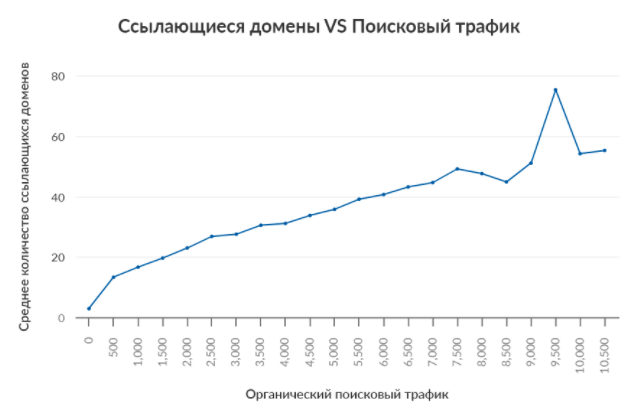
The more links from unique domains lead to a page, the better it ranks in search engines.
NOTE. This is a correlation study. It does not prove causality. Moreover, it's not just the number of links that matters, but also the quality of those links.
In this guide, we'll show you how to find who links to your site, what pages are being linked to, and what else you can do to improve your SEO.
Looking for links
Google Search Console
Google Search Console is the best place to start for most people as it's free.
Not signed up yet? Create a free account.
To see who is linking to your site, go to:
Search Console > select resource > Links > External Links > External Links > Most Referenced Sites
This report will show the top 1000 sites that link to your site. As well as the number of:
Referring Pages (how many pages are linking to your site)
Landing pages (how many of your pages are linked to by other sites)
NOTES. By default these are sorted by referring pages, but you can sort by landing pages
Click on any web site in the list and see the individual pages they link to, as well as how many times. Click on any of the pages to see the referring pages of the donor site.
Search Console also has a report that shows the pages that are most often referenced.
Search Console > Select Resource > Links > External Links > Pages Most Frequently Referenced
By default, this report is sorted by Inbound Links. This way you can see which pages have the most links. Sort by Resource Linking Sites to see which pages have the most links from unique domains. Click on any page to see the sites that link most to that page and the number of links from each. Click on any site to see all pages that link. Any of these reports can be downloaded and saved. Just click on the download icon.
Now let's talk about the disadvantages of using Google Search Console data:
All reports are limited to the top 1000 pages. Because of this, the report seems a bit pointless if your site has more than 1000 pages, or if you have links from more than 1000 unique domains.
No link context. There's no way to see the anchor or text surrounding a link, or to know if a link has a nofollow attribute, etc.
There is no quality metric. When Google talks about "Sites Linking Most Frequently", it's not talking about the quality of links, just the quantity. There is no way to know how good or bad linking sites are, or how useful they are from an SEO perspective.
To fill in those gaps, you need to turn to another tool.
Ahrefs Site Explorer
Ahrefs has the largest index of existing links in the world.
It is updated every 15-30 minutes.
Enter any site, subfolder or page into Ahrefs Site Explorer to see how many links and referring domains (unique) they have.
Site Explorer > enter a site, subfolder or page > select mode > Browse
You can see that Nerdwallet's budgeting guide has 1910 links from 558 referring domains. This brings us to our final conclusion:
With Site Explorer you are not limited to analysing only your web resources.
We are not affiliated with nerdfitness.com in any way, but we can still see their link profile data.
To find out about all the sites that link to the one you specify, go to the Donor Domains report.
Like Search Console, it shows the referring sites and the number of links from each. But there are additional SEO metrics here as well. Such as:
Domain Rating (DR)
Nofollow vs. "dofollow" links
Organic traffic estimates for each referring domain
Found for the first time (i.e. When we first saw each referring site)
If you want to see the links themselves from each site, click on the dropdown icon.
To see the full list of links from all sites, go to the Backlinks report.
For each link in this report, we show the page where it stands, the surrounding text and the target URL (i.e. the Page being linked to) and some other SEO metrics.
By default, similar links are grouped together so you only see unique links.
But you can change the display and see all links or one link per domain.
As with the donor domains report, there are lots of useful filters here too.
A little later I will tell you more about them. For now, I'll just say that they're useful for taking a closer look at certain links and referring sites.
What's next
The thing is, knowing who links to you isn't all that useful.
It's like looking at a list of someone's Facebook friends. You'll have a list of hundreds or thousands of people and that's it. You won't be able to tell the difference between real friends and "friends" they've never seen in real life. No context.
Let's say you're reading this article because:
You've heard that links are important for SEO.
You wanted to know how many links you already have and who they are from.
You need more links to improve your site's visibility in search engines and increase traffic.
Well, let's get to the practical part so you can use link data to improve your SEO and get more traffic.
Build relationships with regular link donors
Those who are constantly linking to your site are called link donors.
These are the people you should keep in touch with.
To see in Google Search Console who these people are, sort the report Sites Linking Most Frequently from most to least.
By and large, you can ignore social networking sites (e.g. linkedin.com, facebook.com), forums (e.g. reddit.com), and other sites with user-generated content.
Focus on links from familiar sites. For example, from all the well-known blogs in your niche.
If you don't have a good relationship with any site, it's worth writing to them, introducing yourself and thanking them for their support.
People tend to link to people they know and like. So a simple greeting can yield good results.
Want an even better strategy?
Find your competitors' regular donors using Ahrefs Site Explorer.
Enter your competitor's domain and go to the Donor Domains report.
Site Explorer > enter your competitor's domain > Donor Domains > add the "dofollow" filter > sort by the number of dofollow links (from most to least)
Look for links from familiar sites or niche blogs.
Click the dropdown icon to see links from each site.
Did you find a good one? Look it up in the donor domains report on your site and see if it has any links to you. If there are none, or too few, it might be worth starting a business relationship with them.
People link to people they know and like. Build relationships with your regular link donors and those who link to your competitors.
Analyse your content that gets the most links
Linkbuilding works best if you have content that people will actually want to link to.
But that doesn't mean infographics will always attract more links than blog posts, or research, or interactive surveys, or another type of content. Different content works in different niches.
To understand what works and what doesn't, it's best to start analysing your pages that are linked to most often.
Search Console > select a resource > Pages linked to most often > sort by Sites with links to the resource
Find out what type of content attracts links in your niche and get busy creating it.
Restore the value of your existing links
Have you ever clicked on a broken link?
Broken links are not only inconvenient for users. They're bad for SEO as well.
Backlinks add weight to your site, some of which then flows to other pages thanks to internal links. Because broken links don't technically exist, they don't have internal links.
In short, broken links degrade a site for search engines, so it's best to fix them.
In Google Search Console, you can do this with the Coverage report.
Search Console > Coverage > Errors tab
There are three basic ways to fix the situation:
Repair dead links.
Put a redirect from the dead page to a relevant existing page.
Ask the link owner to change the link to a working page.
If no good links lead to the page, you can leave the page with a soft 404 error.
Find and fix dead linked pages.
Repeat competitors' links
No two sites or pages have the same link profiles.
You have some links that your competitors don't have. But more importantly, your competitors have links that you don't. In other words, if you want more links, start repeating your competitors' links.
Links come about for a variety of reasons and there are nuances to the process.
So let's keep it simple for now and discuss two easy ways to pick up your competitors' links, starting with "fixing" their broken links.
Find competitors' guest posts and write articles for those same sites. Find your competitors' broken links and assign them to yourself.
Show the content to those most likely to leave a link
Look at the links that point to any page and you'll start to notice something similar.
Find something in common among existing links, find similar potential donors and show them your content.
Links are positively correlated with positions and organic traffic.
However, if you are promoting in a competitive topic, you may need hundreds or thousands of links from unique sites.
For example, take the topic "best credit cards".
Most likely, no one will pass in the top 5 without having links from at least 100-200 unique domains.
Both quality and quantity are important. Therefore, it is not just the number of referring domains. Other factors also matter.
Therefore, it makes sense to promote on less competitive topics and keywords.
There are several ways to find such topics.
You can search for keywords in the Keyword Analysis tool and filter out queries with a low Keyword Difficulty value.
Keyword Analysis > enter an input query > select a report > filter by KD < 10
You can also search for a keyword or phrase related to your site's topic in Content Explorer. Then filter out pages with search traffic but fewer referring domains.
You'll end up with pages with good traffic and a small number of links.
In other words: non-competitive topics.
Click More and go to the Organic keywords tab to see what queries each page ranks for.
Find topics and keywords with little competition and rank for them instead of high competition queries.
AVSEO recommends that you find out who links to your site. But just knowing this is not enough to improve SEO. You need to understand how you stack up against your competitors and more importantly, learn from those who are successful.
For most sites, this is the easiest way to high positions.
ANY QUESTIONS?