



-


-
Business solutions
- How to update old posts with SEO benefits
How to update old posts with SEO benefits
Not every post you publish will rank well in the search engines. Even if you've done keyword analysis and written great content, you won't always get it right the first time.
Find pages with weak content
If you want to increase organic traffic, simply changing the publish date on an old post won't work. You need to find pages that are getting little traffic due to content issues.
To do that, follow the steps in this chart:
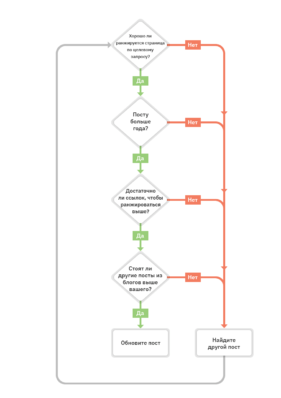
Let's go through each step in more detail.
Find pages that are ranking poorly
Make sure it's not a new page
Filter the link factor
Make sure the query is "informational"
Find pages that are ranking poorly
If your post is ranking in the top 3 for your target query, it's probably not a good candidate for republishing. That's because the risks are higher than the potential rewards. The post is already ranking well, and republishing it could hurt rather than help.
So you need to look for posts that rank poorly for your main query.
You can find such queries using Google Search Console. Go to the Search Results report, select average position and filter the list of keywords with an average position of four or higher.
Go through the list of queries and look for topics that you cover in your posts.
Keep in mind that Console shows the average position, so this figure will not always reflect the current situation. For more accurate results, paste your blog address into Site Explorer and go to the Top Pages report to see which posts generate the most search traffic.
From there, all you have to do is go through the report and find the posts that are ranking poorly for your main target query. It will be handy to look at the URL, Top Query and Position columns.
Make sure it's not a new page
There's no point in updating a recently published post. It takes a while for posts to get links. Google may not immediately realise where an article can rank either.
That's why we usually don't update posts younger than one year old.
You can quickly check the age of a post by looking at the publication date.
Filter out the link factor
Posts don't always rank poorly because of content. Sometimes your competitors simply have better quality links.
To check if this is the case, search for your desired keywords in the Keyword Analysis tool, scroll down to the search results overview and look at the DR and UR scores of the sites and pages that rank above you.
Make sure the query is "informational"
If you're being bypassed by pages with fewer links, it doesn't always mean that updating your content can help you get more traffic. If you're being bypassed by product pages, category pages, or landing pages, it could be that users aren't searching for blog posts.
Update content
If you've found a post to update, you shouldn't expect that simply rewriting it will get you more organic traffic. You need to approach the issue in a systematic way.
Here are the steps you should take:
Make sure the post is relevant to your search intent
Analyse the pages at the top
Analyse the link profile
Make sure the post is relevant to the search intent
The search intent is what the user is looking for. We mentioned this in the previous step when we checked what type of pages were being bypassed in the search results.
But search intent isn't just about the type of content. You need to make sure your post matches the right format and approach.
Content format
This is the format of the pages people are searching for. The most common formats are:
Tutorials
Tutorials
Lists
Guides
Author's articles
Expanded definitions (articles like "what is ...")
Content Approach
This is the unique proposition of the post. It is practically the reason why users should click on the content, as well as the target audience of the post. The main approaches to content creation are:
Beginner's Guide
Complete guide
Top [number] list
Analyse the pages at the top
Once you have decided on the format, the next step is to analyse the pages in the top. To do this, you need to manually go to the pages you want and find the key points. Another good way to find topics is to do an analysis of the missing semantics.
Analyse the link profile
One of the common mistakes when updating posts is to remove important, link-attracting statements. So before you rewrite a post, check the link profile and see where and how the links came from.
There are two reasons why you should do this:
Existing links will be relevant to the content they link to.
You'll be able to get even more similar links.
However, there's no point in leaving everything you find in the link report. If the information is still relevant, valuable and relevant to the topic, leave it in. For example, if several people are linking because of outdated data, it's worth replacing it with fresh data along with updated content.
Republish the post
Republishing the post is the easiest part. Log into your CMS (e.g. WordPress), go to the old post and delete the old content, replacing it with new content. Leave the URL as is. And make sure to update the title and OG tags.
Finally, change the publish date to the current date and click update.
If you've added the site to Google Search Console, it's also worth submitting the article for re-indexing after republishing. To do this, paste the full address of the post into the URL Verification Tool and click Request Indexing.
This step is optional. Google will definitely re-crawl and re-index the post without it. But we have found that it happens faster after the request.
Updating blog posts is a smart way to get more traffic. It was part of AVSEO's strategy to grow the blog, and we're going to use it.
However, it's worth noting that traffic isn't the only reason to update and republish a post. It's also worth updating them to ensure that the content is always up-to-date and accurate.
ANY QUESTIONS?