



-


-
Business solutions
- Micro markup in SEO
Micro markup in SEO
Micromarking is code that helps search engines understand the content of your pages and better present them in search results.

But micro markup can do more - it allows you to improve search engine optimization in other ways.
Why do we need micro markup?
Micro-markup allows search engines to create rich snippets, which typically have a higher click-through rate than “regular” search results. That is, it brings more traffic to your site.
But first and foremost, markup is designed to help search engines understand the content of your pages.
It’s no coincidence that schema.org, the community behind this markup, was created a year before the Google Knowledge Graph, a knowledge base about entities and the relationships between them, appeared.
It’s not hard to guess that one of the main sources for its data is microdata.
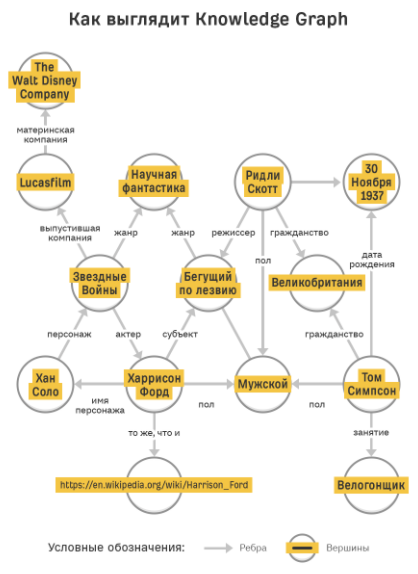
All the edges connecting the vertices in the figure above represent real properties of the micro-layout.
Here we come to the point.
Providing structured information and connecting sets of information about you, your company, products and content benefits everyone:
Google understands markup much better than plain text.
Users get more relevant results.
Site owners receive rich snippets and become entities in the Knowledge Graph.
Inclusion in the Knowledge Graph provides incredible opportunities for brand visibility in search results.
First, when you search for your brand name, a block of knowledge about it will be displayed:
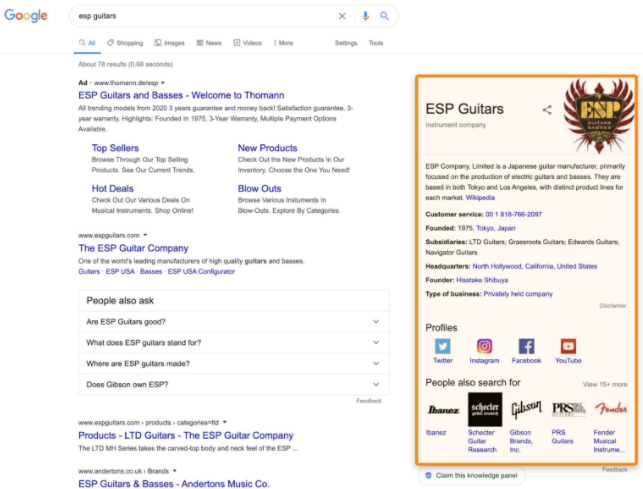
Secondly, there will be a chance that your brand will appear in the results of some non-branded queries:

From a broader perspective, microdata is a key piece of structured data that enables semantic search. Simply put, it allows you to convey the real meaning of the content of URLs to search robots such as Googlebot.
How to approach micro markup
Let's face it: if you are new to SEO, then it is too early for you to think about microdata. There are many other more effective SEO tasks.
You should only start markup if one or both of the following statements are true:
Your pages are already ranking in the top results and their content is eligible to be featured in rich results (more on this later).
Your brand already has an active presence on the Internet, thanks to which it can become significant in the Knowledge Graph.
If this is true, then here's what you need to do:
Explore schema.org
Your starting point is schema.org. It may seem complicated and confusing to beginners, so let us tell you how it all works.
The markup is a two-level hierarchical system. At the top level there are types, each of which has a set of specific properties.
Types determine which category a block of content belongs to. Properties, in turn, describe the content.
There are two things to pay attention to in the code:
You can declare multiple types at the same time. Although the main type in the example is Person, you can also use the Organization type for the worksFor property to provide information about the employer.
Many properties can be used for different types. In this example, this is the name property, which is used in both the Person type and the Organization type.
Choose the markup that has the greatest impact
Don't worry, you don't need to learn hundreds of types and properties. We just wanted to introduce you to schema.org.
As we've already said, rich snippet markup produces the most impact in the least amount of time, but only if your content is already on the first page of the results. In addition, only some schema types and properties can help you get rich snippets.
Google provides a list of them and the necessary documentation, but it may turn out that none of the options suits you. At AVSEO, we don't use rich snippet markup because we don't have a lot of content suitable for it.
The most common content types for rich snippets are:
Markup for frequently asked questions
So complete these basic steps before moving on to more complex markup.
How to implement micro markup
Many SEO specialists shy away from micro markup due to the code-heavy nature of it. But the devil is not as terrible as he is painted. It is enough to grasp the basics and you will understand everything easily.
Generate Markup
It is entirely possible to write micro markup by hand, but it is usually not necessary. If you're using WordPress, there are plenty of plugins that can make the process easier. If not, there are many markup generators at your service. Merkle generator and Schema Builder extension; but there are plenty of options. Please note that these generators typically only cover basic markup. If this is not enough for you, you will have to edit the code yourself.
All code examples most often use the JSON-LD format, which is recommended by Google. In addition, it is the easiest to understand and use.
However, you will often see references to another format called microdata, as it is often used by CMS systems and plugins for them. There is only one other valid format - RDFa (HTML5 extension), but I have never encountered it in practice.
Test your code first
Markup should always be tested before implementation, unless you are using a CMS or plugin that you interact with through the user interface.
To do this, Google offers two easy-to-use tools.
The first is a structured data validation tool. But they plan to abandon it in the future.
The new standard is a rich results verification tool. As the name suggests, it focuses on rich results, which leaves out much of the schema.org vocabulary.
Additionally, the Rich Results Checker does not show errors if you have used markup types or properties incorrectly.
Therefore, we advise checking the markup with both tools while possible.
Place the code on your site
This step will vary depending on your site settings and tagging system. As we already said, here we will discuss JSON-LD as the recommended markup format.
Directly into HTML code
JSON-LD markup takes the form of a script that is placed in the <head> or <body> section of your page's HTML code.
If you are not a webmaster, contact your company's developers and let them handle this task. This will likely involve mapping URLs or URL categories to different markup schemes and highlighting static and dynamic values.
Using Google Tag Manager
For a long time, it was believed that implementing micro markup via GTM was a bad option because Googlebot had to render JavaScript to access it. However, Google recently listed GTM implementation as one of its officially recommended solutions.
This is especially good for marketers who are used to working with GTM. This is a great option for companies where the development team needs a lot of time to make changes for SEO.
We recommend this method only if you are already using GTM to manage your marketing technology stack. Simply add the generated markup as a custom HTML tag and set a trigger based on page view for one or more specific pages.
Using CMS systems and plugins
This is the most common and accessible way for beginners to add micro markup. But with so many different CMSs and plugins out there, it can also be the most confusing.
There is simply no CMS or plugin that does all the work for you. If you need rare micro markup, you will inevitably have to combine the available options. This may also require you to make changes to themes and templates, or insert code into the page directly or via GTM.
Let's take a look at how you can implement common markup types using some popular WordPress SEO plugins.
You should only use one universal SEO plugin such as Yoast, RankMath or The SEO Framework. Using two or more of these plugins will almost certainly cause problems. If your plugin does not allow you to create the necessary markup, additionally use a special plugin.
How to track markup
In Google Search Console, information about all detected markup is located on the Enhancements tab:
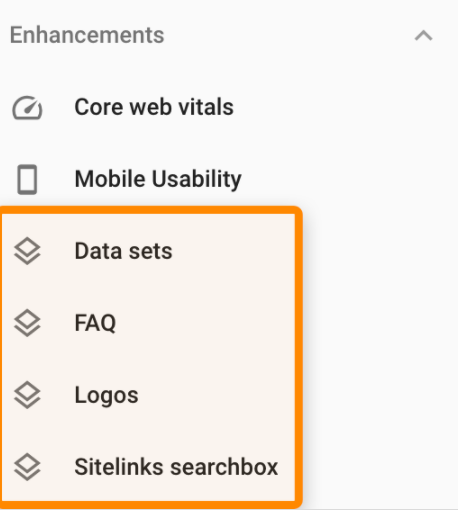
Click on a specific markup type to view the report.
If you checked the markup before implementation, you shouldn't have any problems. It's also worth noting that some types of markup have required properties, which if not present will cause errors. This is usually not a big deal, so don't worry too much about errors or make fixing them a priority.
Micro markup at first glance seems much scarier than it actually is. Most sites are able to mark up their content quickly and easily.
Adding markup to your pages will not only help you make them stand out in search results with rich snippets, but will also contribute to the development of meaningful coherence on the web. A happy by-product of this could be that your brand is included in the Knowledge Graph, which has a ton of benefits.
ANY QUESTIONS?